August 27, 2023
|
5 min de lecture
Is Your Proctoring Solution a Security and Privacy Threat?
The US Department of Education's Privacy Technical Assistance Center has documented how data breaches and malware attacks have affected education systems across every sector. Most online proctoring services require browser extensions or plugins that create exactly the kind of installation-based malware vector that security researchers flag as high risk. This post examines the threat, what organizations should require from their proctoring vendors, and why a no-installation approach eliminates the risk at the source.


The US Department of Education's Privacy Technical Assistance Center published a presentation titled Security Threats: Education Systems in the Crosshairs, in which security advisor Mike Tassey documented how data breaches, hacks, and privacy incidents have affected organizations across virtually every sector, from NASA and Citigroup to local school systems.
The warning is directly relevant to any organization using online proctoring. The data that proctoring services collect, including names, government-issued ID, biometric images, and session recordings, is exactly the kind of information that makes education systems a target.
The Threat Landscape Has Changed
Cyber-theft has become fully commoditized. There is an active black market for personal data, and an underground economy where over two million pieces of malware are built and sold every year. This malware is designed to gather precisely the kind of information proctoring platforms collect: Social Security numbers, addresses, birth dates, and identity credentials.
Tassey specifically noted that children's identities are particularly valued by data thieves because they are, in his words, fresh. A child's identity may go undetected for years before the theft is discovered, making it a high-value target for long-term fraud.
The alarming part is how malware typically gets onto devices. It is not usually through pirated software or poor security settings. It enters through plugins and browser extensions that users install themselves, often for legitimate purposes. The installation is the vector.
Why Proctoring Plugins Create Specific Risk
Most online proctoring services require users to install browser extensions or plugins to enable monitoring. Each of these installations represents an opportunity for malware to enter the device, either during the initial installation or through a subsequent update, without the user's knowledge or permission.
Tassey's research notes that on average there are one to five bugs for every 1,000 lines of code. For organizations that have not completed independent code reviews of the proctoring software they deploy, those bugs represent an unexamined attack surface. Malware can be introduced into code updates without detection, meaning a plugin that was clean at installation may not remain so.
At minimum, organizations should be instructing learners to disable or uninstall proctoring plugins and extensions immediately after use. The risk does not end when the exam does.
What a Code Review Should Cover
Organizations that require learners to install proctoring software should conduct, or require their vendor to provide evidence of, a code review that addresses:
- Potential malware embedded in the plugin or extension code
- Errors or vulnerabilities that could be exploited by third parties
- Whether the software receives automatic updates, and what review process governs those updates
- What data the software transmits, to where, and under what conditions
If a vendor cannot provide clear answers to these questions, the software should not be deployed on learner devices.
The Case for No-Installation Proctoring
The most effective way to eliminate installation-based security risk is to remove the installation requirement entirely. Integrity Advocate's platform is browser-based and requires no plugin, extension, or application installation in most cases. There is nothing to install, nothing running in the background after the session ends, and no update mechanism that could introduce malware without the user's knowledge.
For use cases that do require a lockdown browser, Integrity Advocate's solution uses fully open source code, does not accept automatic updates after installation, and does not transmit data beyond what is required for the session. The code is publicly available for inspection.
The US Department of Education's guidance on protecting student privacy points to the same principle: the safest data handling approach minimizes what is collected, minimizes how long it is retained, and minimizes the software footprint on learner devices.
{{post-cta}}
Continuer la lecture

What’s Your Assessment Security Plan for 2026?
January 8, 2026
|
5 min de lecture
As online assessment continues to scale, the complexity of protecting exam integrity has grown alongside it. AI misuse, organized cheating schemes, rising privacy expectations, and increased scrutiny around fairness and defensibility are reshaping what effective assessment security really requires. This post examines how leading programs are moving beyond reactive, one-size-fits-all proctoring toward intentional assessment protection strategies built around four principles: designing integrity into the assessment experience, strengthening security without sacrificing privacy, combining technology with human judgment, and delivering outcomes that hold up to scrutiny.
Online proctoring is foundational to how assessments are delivered today. But as adoption has grown, so has the complexity of protecting exam integrity. AI misuse, organized cheating, rising privacy expectations, and increased scrutiny around fairness and defensibility are reshaping what effective assessment security really looks like.
As we look ahead, programs face a critical question: Is your assessment security strategy keeping pace with today’s risks?
The evolving role of online proctoring in assessment security
Early online proctoring solutions focused heavily on surveillance and rule enforcement. While monitoring still plays a role, it’s no longer sufficient on its own.
Modern remote proctoring must support a broader goal: assessment protection that is fair, proportional, and defensible, for both programs and exam-takers. That means balancing security and privacy, automation and human review, scalability and accuracy.
Assessment security today isn’t just about catching misconduct. It’s about protecting the credibility of the assessment itself.
Assessment security as a strategy.
Leading programs are moving beyond one-size-fits-all online proctoring tools and adopting more intentional assessment protection strategies. Here’s what that shift looks like.
1. Designing Integrity Into the Remote Assessment Experience
Strong assessment protection starts long before an exam begins. Programs are increasingly designing integrity into their assessments, aligning exam structure, delivery methods, and proctoring configurations to the level of risk involved. Thoughtful design reduces opportunities for misconduct and allows online proctoring to function as part of a cohesive security framework, rather than a reactive safeguard.
2. Strengthening assessment security without sacrificing privacy
As remote proctoring becomes more prevalent, privacy expectations continue to rise. Assessment security that relies on invasive monitoring can undermine trust and damage the credibility of a program. In 2026, effective online proctoring must protect exam integrity without over-collecting data or creating unnecessary friction for exam-takers.
Privacy-first assessment protection is a requirement.
3. Combining technology and human judgment in online proctoring
Automation is essential for scale, but it can’t replace context. AI-powered online proctoring tools are effective at identifying anomalies and potential risks. Human review, however, remains critical for interpreting behavior, applying policy consistently, and ensuring fair outcomes.
The most defensible assessment security models in 2026 will continue to rely on a hybrid approach, where technology flags risk and humans make informed decisions.
4. Delivering defensible, trusted assessment outcomes
Assessment protection doesn’t end when the exam is submitted.
Programs must be able to stand behind their results, whether responding to learner appeals, audits, or regulatory inquiries. Transparent workflows, documented review processes, and consistent decisioning are essential components of modern assessment security. Online proctoring is only effective if the outcomes it supports are trusted.
Questions to ask as you plan your 2026 assessment security strategy
As online and remote proctoring continue to evolve, programs should be asking:
- Are our assessment security controls aligned to real risk, or legacy practices?
- Does our online proctoring approach protect exam-taker privacy as well as exam integrity?
- Are we relying too heavily on automation, or do we have meaningful human oversight?
- Can we confidently defend our assessment outcomes if they’re challenged?
Assessment protection is no longer a checkbox. It’s an ongoing strategy, one that must evolve alongside technology, expectations, and the future of remote assessment.
See how Integrity Advocate can help
Across education, credentialing, and workforce training, organizations are rethinking how online proctoring and assessment security fit into their long-term plans. How can Integrity Advocate help shape your assessment security strategy this year? Schedule a Demo today!
{{post-cta}}

Where Does Secure Proctoring End and Privacy Invasion Begin?
June 19, 2025
|
5 min de lecture
There is a clear line between oversight and surveillance in online proctoring, and most platforms cross it. When tools collect more data than necessary, require invasive installations, or store sensitive information beyond its purpose, they do not just create privacy exposure. They erode the trust that makes a certification meaningful. This post examines where that line is, why more surveillance does not mean more security, how rising compliance standards like ANSI/ASSP Z490.1-2024 define accountability without requiring overcollection, and what privacy-first proctoring actually looks like in practice.
A waiter is taking an online assessment to earn their alcohol serving certification. They’re at home, using a personal laptop. They scan their government ID to verify their identity. And as soon as the test starts, their webcam is on. So is screen sharing.
{{post-stat-highlight}}
Here’s the thing: online assessments like these need oversight. But that doesn’t mean they need to feel like surveillance. When proctoring tools overstep, they don’t just violate privacy—they break trust, reduce engagement and risk the credibility of the certification itself.
This isn’t about watching more screens. It’s about building systems that respect boundaries, protect integrity and actually work.
What test administrators are actually looking for
If you’re leading training, certifying professionals or managing compliance programs, chances are you didn’t wake up this morning thinking, “Let’s go shopping for proctoring software.”
What you are looking for is peace of mind. You want to:
- Make sure the right person is taking the test
- Confirm they were engaged and followed the rules
- Keep your programs compliant and your reputation protected
That’s it. You're not trying to invade someone’s personal space or collect more data than necessary—you just need reliable verification and fair oversight.
But too many platforms miss the point. They require installs that clash with IT policies, ask for broad system access, or quietly gather data that goes far beyond what's needed. And in some cases, they’ve failed to keep that data safe.
In 2020, nearly half a million user accounts from a widely used online proctoring tool—including names, email addresses, phone numbers and home addresses—were leaked after a breach. Institutions from the U.S., UK and Australia were all impacted, and the fallout was swift: student backlash, privacy concerns and institutional scrutiny from all sides.
It was a wake-up call. When proctoring crosses the line, the risks aren’t theoretical. They’re reputational—and very real.
With Integrity Advocate, privacy isn't an afterthought. It's the starting point. No excess data collection. No invasive tech. No guesswork about where that information ends up.
Because when you’re asking users to trust you with their identity, you better be ready to protect it.
Why more surveillance doesn’t mean more security
In the race to stay compliant, it’s easy to assume that collecting more data means covering more bases. But the truth is, adding layers of surveillance doesn’t make an assessment more secure—it just makes it harder to manage risk.
Think of it like airport security with no filters: scanning every bag, flagging every item and then leaving one person to sort through it all. It’s noisy, it’s overwhelming and it misses the point.
It’s the same with proctoring.
Tools that over-collect create a false sense of control while actually increasing privacy exposure, friction for users and administrative burden. What organizations really need is technology that collects only what’s necessary, and human context to help make sense of it. And now, that kind of clarity isn’t just a nice-to-have. It’s becoming a requirement.
The compliance standard is rising
This isn’t just about ethics. It’s about meeting the new reality of compliance.
ANSI/ASSP Z490.1-2024 raises the bar for how training is delivered and verified. It’s not enough to say a course was offered; you now need to prove it was completed by the right person, in the right conditions, with engagement that can stand up to scrutiny.
That means identity verification. Participation monitoring. Records that hold up under audit.
But nowhere in the standard does it say you need to surveil someone’s entire desktop or store unnecessary data just to meet the mark.
The spirit of ANSI Z490.1 is accountability—not overcollection. If your current system makes compliance feel more like risk exposure, it’s time to rethink what you're using to prove integrity in the first place.
Oversight ≠ Overreach
For us, this work has never just been about tech.
It started with a simple, serious belief: when it comes to safety-critical training, the integrity of an assessment isn’t optional. It’s how lives are protected. And how organizations prove they’re doing things the right way.
That’s why we approach oversight differently.
At Integrity Advocate, we’re not here to control every click. We’re here to confirm that the right people are showing up, engaging fully and earning results that matter.
We do that by designing for trust—not surveillance.
- No installs. No plug-ins. No hidden tracking.
- Only collecting what’s necessary to confirm identity and engagement.
- Human review of flagged sessions to ensure fairness, accuracy and discretion.
- Clear, transparent policies that respect the user and reduce risk for the organization.
Our goal isn’t to catch someone. It’s to build systems that make cheating irrelevant, because integrity is built in from the start.
Scale doesn’t have to come at a cost
Meeting compliance isn’t a small-scale problem. You might be onboarding thousands of learners, recertifying entire workforces or delivering credentials across dozens of jurisdictions.
The stakes are high. And so is the volume.
But here's the good news: you don’t have to trade trust for efficiency.
When Smart Serve Ontario needed to recertify tens of thousands of workers after a provincial policy shift, they didn’t have months to redesign their program or train their users. They needed a solution that scaled overnight.
By partnering with Integrity Advocate, they got:
- No software installs.
- No new platforms to learn.
- No additional support surge.
Just seamless, secure delivery that respected their learners, stood up to scrutiny and worked at scale.
That’s what smart oversight looks like. When compliance needs to move fast, you need a partner who can keep up without cutting corners.
So, where does secure proctoring end and privacy invasion begin?
It ends the moment the solution starts collecting more than it needs. It begins the second the user feels monitored instead of supported.
That’s the line.
For compliance officers, credentialing bodies and training leaders, that line matters more than ever. The tools you choose don’t just reflect your operational standards—they reflect your values.
Proctoring should confirm identity, not compromise it. At Integrity Advocate, we don’t believe you have to choose between security and simplicity or between compliance and compassion. You can have both. You should have both.
If your current solution is starting to raise questions about trust and compliance, it might be time for a conversation. We’re ready when you are.
{{post-cta}}

AI-Powered Online Proctoring Software Needs Human Oversight
September 16, 2025
|
5 min de lecture
AI-powered proctoring can monitor at scale, but it cannot understand context, weigh consequences, or defend a certification decision to a regulator or accreditor. In safety-critical industries where a missed harness check or a wrongly credentialed healthcare worker can cost lives, the blind spots of automated-only proctoring become serious liabilities. This post examines what AI cannot do in high-stakes assessment, what standards like ANSI/ASSP Z490.1-2024, ISO/IEC 17024, and NCCA require in terms of defensibility and human oversight, and why the right model is AI plus human judgment rather than either alone.
Automation promises speed. But in compliance, speed without accuracy can be devastating.
AI is now woven into training and certification. It monitors test-takers, flags anomalies, and produces reports at a pace no human could match. For compliance leaders facing relentless pressure, it looks like the ideal solution: scalable, efficient, impartial.
But here’s the catch: AI doesn’t grasp the stakes of being wrong.
- A missed harness check on a construction site isn’t just noncompliance, it can mean a fatal fall.
- An overlooked question in food safety training isn’t just a technicality, it can trigger a life-threatening allergic reaction.
- A nurse credentialed without proper oversight isn’t simply a paperwork error, it’s a direct risk to patient safety.
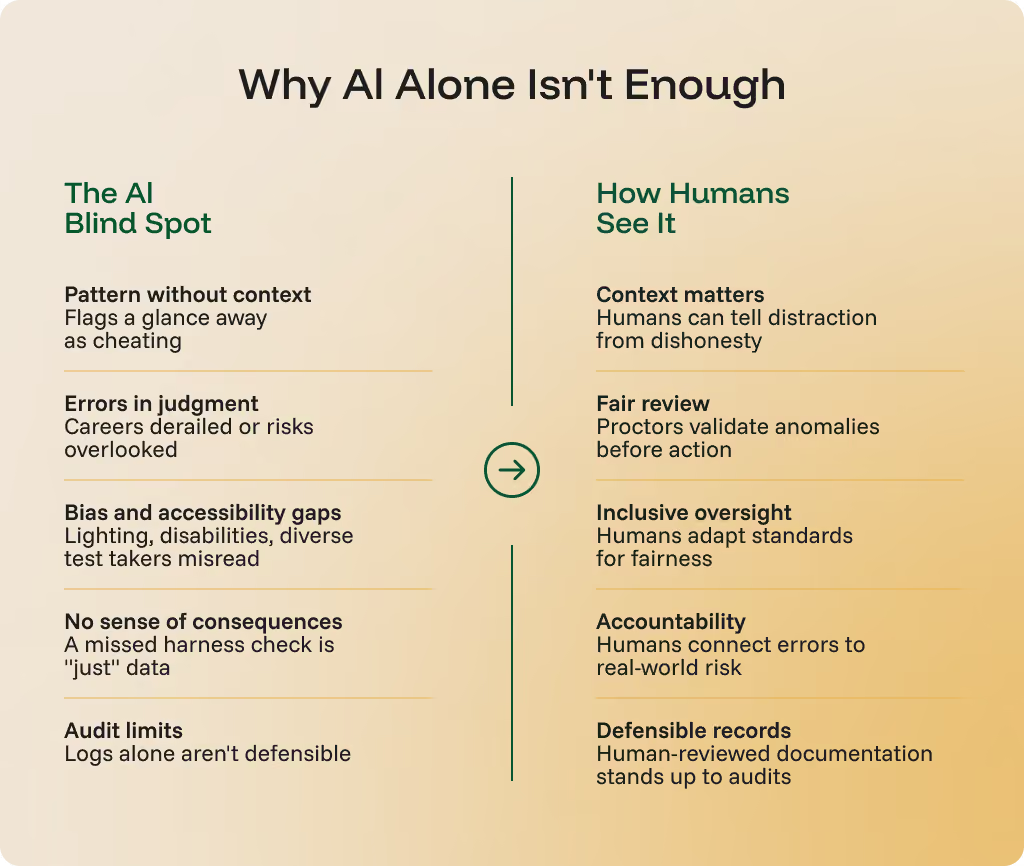
AI-powered online proctoring software can detect patterns, but it can’t weigh consequences. It can’t tell the difference between distraction and dishonesty. It can’t stand in front of an accreditor or regulator and defend a decision.
And compliance leaders know the stakes. 64% of frontline workers say injuries they’ve experienced or witnessed could have been prevented with better training, according to a YouGov survey of more than 2,000 workers in Australia, the UK, and the US. When proctoring systems prioritize speed over judgment, gaps spill from the classroom into the workplace.
{{post-stat-highlight}}
That’s why proctoring can’t be left to automation alone. Judgment, accountability, and defensibility require a human in the loop.
AI’s blind spots
For all its processing power, AI often misses the context, fairness, and consequences behind the data.
Pattern vs. context
AI can spot anomalies, but it can’t understand people. To the algorithm, a student glancing away as their child enters the room looks no different than someone searching for an answer. Without human judgment, honest learners get flagged, reputations suffer, and trust in the system erodes, all while true violations can still slip by unnoticed.
Risks of misjudgment
The real danger isn’t just inaccuracy, it’s the consequences. A nursing candidate wrongly flagged can lose months of progress, along with trust in the system meant to support them. Meanwhile, a missed violation on a commercial driving exam could place an unqualified driver behind the wheel of your company’s vehicle, endangering both reputation and public safety.
Bias and accessibility
AI models are not neutral. From lighting conditions to facial recognition inaccuracies, automation can inadvertently disadvantage test-takers with disabilities, those in non-standard testing environments, or individuals from diverse cultural backgrounds. This creates inequities that undermine the fairness of certification processes. At Integrity Advocate, we work to eliminate these inequities, making the certification process seamless, accessible, and fair for every test-taker.
No sense of consequences
Perhaps the greatest blind spot is this: AI doesn’t “understand” what a mistake means. It cannot connect a failed harness safety check to a potential fall on a job site. It doesn’t grasp that mishandled food safety could trigger an allergen outbreak. Without that ethical and practical awareness, AI remains a tool that must be guided by human oversight.
Certifications in focus: why proctoring integrity matters
The stakes of proctoring reach far beyond academia. They’re practical and sometimes life-or-death.
Consider a few high-stakes examples:
- Nursing exams and clinical credentials ensure healthcare workers can safely treat patients.
- Electrical licenses confirm that workers can install and maintain systems without risking fires or electrocution.
- Commercial Driver’s Licenses (CDL) certify drivers who transport goods and passengers across public roads.
- ServSafe and OSHA certifications guard against foodborne illness and workplace hazards.
These certifications aren’t just personal milestones. They validate competence in roles that protect lives and communities. Without trustworthy proctoring, credentials lose credibility. Organizations risk liability, and the public loses trust in the professionals meant to safeguard them.
AI-Only Proctoring Falls Short
When the stakes are high, oversight must be more than automated pattern recognition. AI can monitor, record, and flag, but it cannot fully understand context or consequences. Relying on AI alone risks undermining the very certifications designed to protect lives and communities.
ANSI and accreditation frameworks: compliance by design
The updated ANSI/ASSP Z490.1-2024 standard sets clear expectations for safety, health, and environmental (SH&E) training.
For compliance leaders, a few key takeaways stand out:
- Reliability and fairness are non-negotiable.
- Oversight and defensibility must be built into training and assessment.
- Documentation and accountability are essential in the event of an audit or incident.
These requirements go beyond what automation alone can provide. Standards demand human verification, ethical review, and the ability to defend every certification decision.
Beyond ANSI: ISO and NCCA
International standards like ISO/IEC 17024 and U.S. frameworks like the National Commission for Certifying Agencies (NCCA) reinforce the same principle: defensible certification requires human oversight. Without it, organizations risk failed audits, loss of accreditation, and legal exposure.
Hybrid Online Proctoring: AI Detection + Human Discretion
The answer is not to reject AI, but to integrate it thoughtfully. The most effective approach is AI plus human oversight, where technology enhances efficiency, but people ensure fairness, context, and compliance.
Scalable monitoring with human review
AI can monitor at scale, flagging potential anomalies. But those red flags should be reviewed by trained human proctors who can interpret context and make defensible decisions.
Audit trails and documentation
Human oversight is essential for building robust audit trails. When compliance checks or regulatory audits arise, organizations must show that their proctoring process was fair, valid, and defensible. Documentation reviewed and validated by people is far more credible than machine logs alone.
Automation accelerates, human judgment protects
AI has transformed training and monitoring with unprecedented speed and scale. Yet in safety-critical industries, automation is a tool, not a safeguard. True protection comes from human judgment, ethical oversight, and alignment with compliance standards.
With standards like ANSI/ASSP Z490.1-2024 raising the bar for defensibility, organizations must recognize that proctoring isn’t just a technical step, it’s a compliance-critical safeguard that protects lives, preserves trust, and ensures training fulfills its purpose.
Smart systems drive efficiency. Human oversight delivers safety. Together, they make compliance simple, scalable, and defensible.
Online proctoring software built for compliance and trust
When compliance is defensible, organizations, and the people they serve, are safer. That’s why proctoring must go beyond automation.
At Integrity Advocate, we combine AI efficiency with human oversight to ensure every training program is verifiable, fair, and aligned with the latest standards. That means:
- Confirmed identities
- Monitored participation
- Defended credentials
No guesswork. No blind spots. Just compliance you can stand behind.
Ready to safeguard your compliance? Let’s leverage the combined power of AI and human oversight, together.
{{post-cta}}
Foire aux questions
Trouvez les réponses aux questions les plus fréquemment posées par nos clients.
Browser extensions and plugins require installation on the learner's device, which creates an opportunity for malware to enter during installation or through subsequent updates. Security research cited by the US Department of Education's Privacy Technical Assistance Center indicates that there are one to five bugs for every 1,000 lines of code on average, meaning unreviewed proctoring software may contain vulnerabilities that can be exploited without the user's knowledge.
Malware can be embedded in the original plugin code or introduced through an automatic update pushed after installation. Because most users do not conduct code reviews of the software they install, and because updates often occur silently in the background, the malware may be present for an extended period before it is detected.
Security advisor Mike Tassey, in a presentation made available by the US Department of Education's Privacy Technical Assistance Center, noted that data thieves place particular value on children's identities because they are unused. A child's credit history is clean, and identity theft may go undetected for years, making it highly valuable for long-term fraud.
A code review is an independent examination of software code to identify bugs, vulnerabilities, and potential malware. For proctoring plugins and extensions, a code review should assess what data the software collects and transmits, whether automatic updates could introduce malicious code, and whether any existing vulnerabilities could be exploited by third parties. Organizations that deploy proctoring software without a code review are accepting an unexamined level of security risk.
Integrity Advocate's platform is browser-based and requires no plugin, extension, or application to run.