September 19, 2025
|
5 min read
Feature Update: Enhanced Video Feed Out for More Efficient Review
Integrity Advocate has released a major enhancement to Video Feed Out, one of the most requested updates from client administrators. Violations and flags are now marked directly in the session timeline, allowing admins to jump between flagged events instantly, filter by violation type, and review audio snippets that distinguish flagged from unflagged moments, all without toggling between the session feed and a separate violations report page.

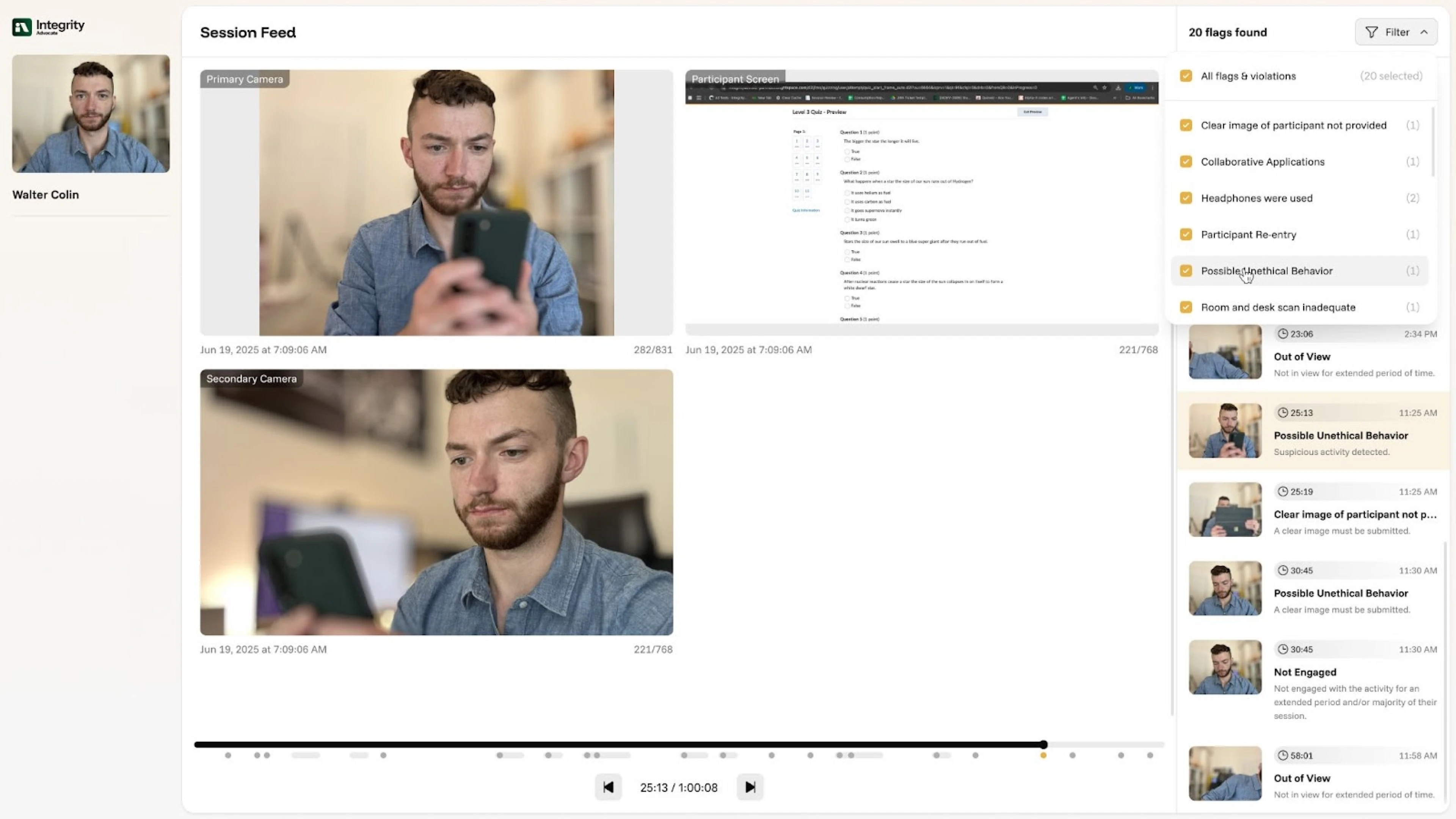
A major upgrade is here for Video Feed Out - making it easier than ever to review session flags in context. This is one of the most requested enhancements from our clients, and when our clients have requests that will make their lives easier, we listen.
What’s New
With this update, client admins can now see flags and violations directly within the session timeline, making it easier than ever to understand events in their proper context.
Key improvements include:
- See everything in context – Violations are marked directly in the timeline.
- Review faster – Jump between flagged events instantly.
- Hear what matters – Audio snippets now clearly distinguish flagged vs. unflagged moments.
- Stay focused – Filter by violation type to streamline investigations.
Why It Matters
Previously, admins had to toggle between the full session feed and a separate violations report page. This made reviews more time-consuming and sometimes confusing.
With contextual flags built right into the timeline, reviews are now:
- Faster – eliminating back-and-forth navigation.
- More accurate – violations are shown exactly where they occurred.
- More efficient – filter by type and focus only on what matters.
This enhancement is just one example of how we take client requests seriously and build features around your needs.
This update is now available to all clients with the premium Video Feed Out feature. If you are a current client and would like to enable it, reach out to your Account Manager.
If you are interested in seeing Enhanced Video Feed Out in action, fill out the form below.
{{post-cta}}
Keep reading

More Flags ≠ More Security: How Smarter Review Saves Admins Time and Stress
January 12, 2026
|
5 min read
Flag overload is one of the most common and least discussed problems in online proctoring. When AI-only systems flag everything from background noise to lighting changes, administrators are left sorting through queues of low-risk alerts to find the few that actually matter. This post explains why more flags do not equal more security, how human review filters out noise before it reaches the administrator queue, and what a smarter review model looks like in practice, including a side-by-side comparison of AI-only versus AI plus human review across flagging volume, admin workload, and decision quality.
If you are using an online proctoring tool, and your post-exam review process feels overwhelming, it’s usually not because too little is being flagged, it’s because too much is.
As online and remote assessments scale, many programs respond by tightening controls and increasing automation. On paper, it sounds like a strong security posture. In practice, it often creates a different problem entirely: flag overload.
And that overload lands squarely on administrators.
The Hidden Cost of “Too Many Flags”
When AI-only proctoring systems flag everything from background noise to lighting changes, administrators are left sorting through long queues of low-risk alerts to find the few that actually matter.
That leads to:
- Hours spent reviewing non-issues
- Increased stress during post-exam review cycles
- Slower score releases and decision-making
- Fatigue that makes true violations harder to spot
More data doesn’t automatically mean better security. In many cases, it creates more work — without improving outcomes.
A simple rule of thumb:
More flags ≠ more security.
Why Post-Exam Review Is Where Programs Feel the Pain
The post-exam phase is where integrity decisions become real. This is the moment where:
- Administrators must determine if a violation truly occurred
- Programs need defensible outcomes they can stand behind
- Appeals, audits, or compliance reviews may follow
When every flagged event is treated equally, administrators are forced into a reactive role, reviewing volume instead of focusing on risk.
That’s where smarter review models make the biggest difference.
How Human Review Changes the Equation
Integrity Advocate was designed to reduce noise, not increase it.
Instead of passing every automated flag directly to administrators, Integrity Advocate uses highly trained human reviewers to evaluate context before an incident ever reaches your queue.
Human reviewers can:
- Distinguish normal behavior from suspicious activity
- Understand environmental and accessibility factors
- Identify patterns that automation alone can’t
- Filter out false positives before they create work
The result? Administrators see fewer, higher-quality incidents, and only when action is truly needed.
AI vs. Human Review: A Practical Comparison
Here’s a simple way to think about the difference:
Automation is powerful, but without human judgment, it often creates more work than it removes.
What This Means for Administrators
When human review is built into the process:
- Post-exam review time drops significantly
- Admins spend time on real integrity issues, not noise
- Stress and cognitive load are reduced
- Decisions are easier to defend and explain
Security becomes proactive instead of reactive, and review workflows become sustainable, even at scale.
Smarter Security Is About Focus, Not Surveillance
Strong assessment security isn’t about watching everything. It’s about identifying what actually matters, and acting with confidence when it does.
By combining AI efficiency with human judgment, Integrity Advocate helps programs protect assessment integrity without overwhelming the people responsible for it.
Because the goal isn’t more flags. It’s better outcomes.
{{post-cta}}

AI-Powered Online Proctoring Software Needs Human Oversight
September 16, 2025
|
5 min read
AI-powered proctoring can monitor at scale, but it cannot understand context, weigh consequences, or defend a certification decision to a regulator or accreditor. In safety-critical industries where a missed harness check or a wrongly credentialed healthcare worker can cost lives, the blind spots of automated-only proctoring become serious liabilities. This post examines what AI cannot do in high-stakes assessment, what standards like ANSI/ASSP Z490.1-2024, ISO/IEC 17024, and NCCA require in terms of defensibility and human oversight, and why the right model is AI plus human judgment rather than either alone.
Automation promises speed. But in compliance, speed without accuracy can be devastating.
AI is now woven into training and certification. It monitors test-takers, flags anomalies, and produces reports at a pace no human could match. For compliance leaders facing relentless pressure, it looks like the ideal solution: scalable, efficient, impartial.
But here’s the catch: AI doesn’t grasp the stakes of being wrong.
- A missed harness check on a construction site isn’t just noncompliance, it can mean a fatal fall.
- An overlooked question in food safety training isn’t just a technicality, it can trigger a life-threatening allergic reaction.
- A nurse credentialed without proper oversight isn’t simply a paperwork error, it’s a direct risk to patient safety.
AI-powered online proctoring software can detect patterns, but it can’t weigh consequences. It can’t tell the difference between distraction and dishonesty. It can’t stand in front of an accreditor or regulator and defend a decision.
And compliance leaders know the stakes. 64% of frontline workers say injuries they’ve experienced or witnessed could have been prevented with better training, according to a YouGov survey of more than 2,000 workers in Australia, the UK, and the US. When proctoring systems prioritize speed over judgment, gaps spill from the classroom into the workplace.
{{post-stat-highlight}}
That’s why proctoring can’t be left to automation alone. Judgment, accountability, and defensibility require a human in the loop.
AI’s blind spots
For all its processing power, AI often misses the context, fairness, and consequences behind the data.
Pattern vs. context
AI can spot anomalies, but it can’t understand people. To the algorithm, a student glancing away as their child enters the room looks no different than someone searching for an answer. Without human judgment, honest learners get flagged, reputations suffer, and trust in the system erodes, all while true violations can still slip by unnoticed.
Risks of misjudgment
The real danger isn’t just inaccuracy, it’s the consequences. A nursing candidate wrongly flagged can lose months of progress, along with trust in the system meant to support them. Meanwhile, a missed violation on a commercial driving exam could place an unqualified driver behind the wheel of your company’s vehicle, endangering both reputation and public safety.
Bias and accessibility
AI models are not neutral. From lighting conditions to facial recognition inaccuracies, automation can inadvertently disadvantage test-takers with disabilities, those in non-standard testing environments, or individuals from diverse cultural backgrounds. This creates inequities that undermine the fairness of certification processes. At Integrity Advocate, we work to eliminate these inequities, making the certification process seamless, accessible, and fair for every test-taker.
No sense of consequences
Perhaps the greatest blind spot is this: AI doesn’t “understand” what a mistake means. It cannot connect a failed harness safety check to a potential fall on a job site. It doesn’t grasp that mishandled food safety could trigger an allergen outbreak. Without that ethical and practical awareness, AI remains a tool that must be guided by human oversight.
Certifications in focus: why proctoring integrity matters
The stakes of proctoring reach far beyond academia. They’re practical and sometimes life-or-death.
Consider a few high-stakes examples:
- Nursing exams and clinical credentials ensure healthcare workers can safely treat patients.
- Electrical licenses confirm that workers can install and maintain systems without risking fires or electrocution.
- Commercial Driver’s Licenses (CDL) certify drivers who transport goods and passengers across public roads.
- ServSafe and OSHA certifications guard against foodborne illness and workplace hazards.
These certifications aren’t just personal milestones. They validate competence in roles that protect lives and communities. Without trustworthy proctoring, credentials lose credibility. Organizations risk liability, and the public loses trust in the professionals meant to safeguard them.
AI-Only Proctoring Falls Short
When the stakes are high, oversight must be more than automated pattern recognition. AI can monitor, record, and flag, but it cannot fully understand context or consequences. Relying on AI alone risks undermining the very certifications designed to protect lives and communities.
ANSI and accreditation frameworks: compliance by design
The updated ANSI/ASSP Z490.1-2024 standard sets clear expectations for safety, health, and environmental (SH&E) training.
For compliance leaders, a few key takeaways stand out:
- Reliability and fairness are non-negotiable.
- Oversight and defensibility must be built into training and assessment.
- Documentation and accountability are essential in the event of an audit or incident.
These requirements go beyond what automation alone can provide. Standards demand human verification, ethical review, and the ability to defend every certification decision.
Beyond ANSI: ISO and NCCA
International standards like ISO/IEC 17024 and U.S. frameworks like the National Commission for Certifying Agencies (NCCA) reinforce the same principle: defensible certification requires human oversight. Without it, organizations risk failed audits, loss of accreditation, and legal exposure.
Hybrid Online Proctoring: AI Detection + Human Discretion
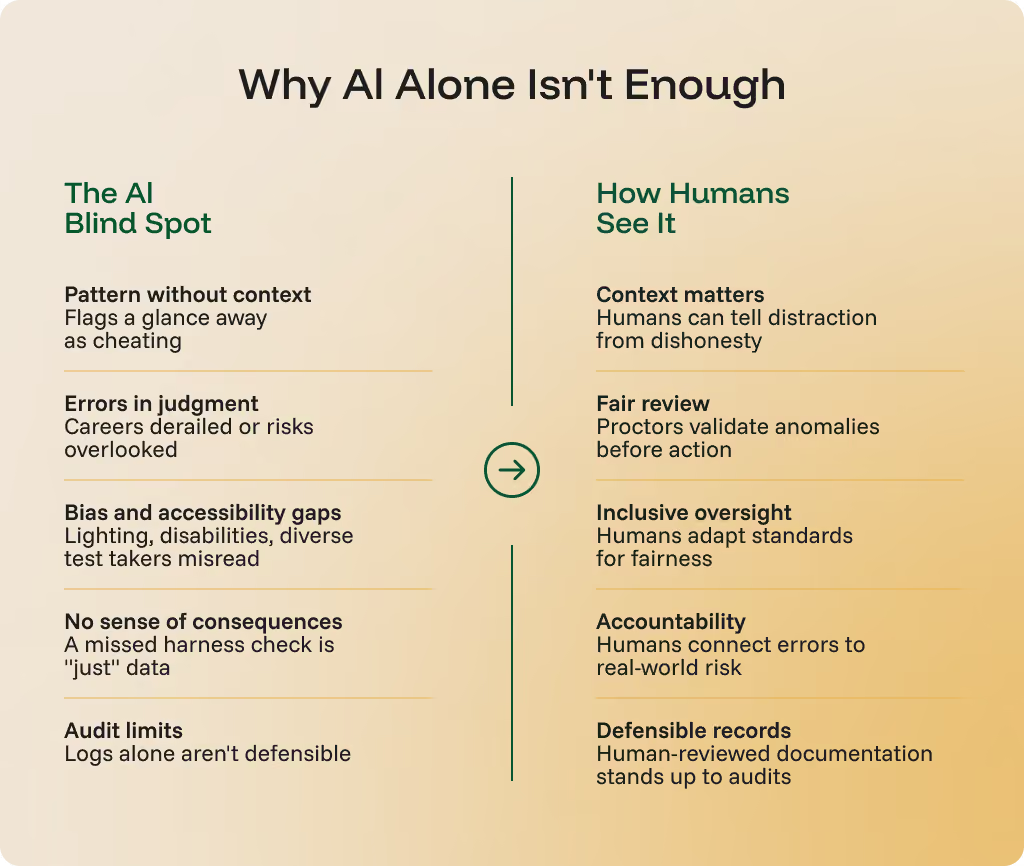
The answer is not to reject AI, but to integrate it thoughtfully. The most effective approach is AI plus human oversight, where technology enhances efficiency, but people ensure fairness, context, and compliance.
Scalable monitoring with human review
AI can monitor at scale, flagging potential anomalies. But those red flags should be reviewed by trained human proctors who can interpret context and make defensible decisions.
Audit trails and documentation
Human oversight is essential for building robust audit trails. When compliance checks or regulatory audits arise, organizations must show that their proctoring process was fair, valid, and defensible. Documentation reviewed and validated by people is far more credible than machine logs alone.
Automation accelerates, human judgment protects
AI has transformed training and monitoring with unprecedented speed and scale. Yet in safety-critical industries, automation is a tool, not a safeguard. True protection comes from human judgment, ethical oversight, and alignment with compliance standards.
With standards like ANSI/ASSP Z490.1-2024 raising the bar for defensibility, organizations must recognize that proctoring isn’t just a technical step, it’s a compliance-critical safeguard that protects lives, preserves trust, and ensures training fulfills its purpose.
Smart systems drive efficiency. Human oversight delivers safety. Together, they make compliance simple, scalable, and defensible.
Online proctoring software built for compliance and trust
When compliance is defensible, organizations, and the people they serve, are safer. That’s why proctoring must go beyond automation.
At Integrity Advocate, we combine AI efficiency with human oversight to ensure every training program is verifiable, fair, and aligned with the latest standards. That means:
- Confirmed identities
- Monitored participation
- Defended credentials
No guesswork. No blind spots. Just compliance you can stand behind.
Ready to safeguard your compliance? Let’s leverage the combined power of AI and human oversight, together.
{{post-cta}}

The Hidden Liability in Every Online Safety Training Program
June 10, 2026
|
5 min read
Online safety training scaled compliance but it also created an accountability gap that most programs haven't closed. When an incident happens, a timestamp isn't enough; what protects your organization is a verified record proving the right person completed the training, with real engagement, that holds up under scrutiny.
Key Takeaways
- June is National Safety Month, emphasizing the urgency for effective workplace safety training verification due to ongoing workplace injuries.
- In 2024, there were 4,337 worker fatalities from preventable causes, highlighting the need for genuine training engagement.
- Online safety training lacks accountability, often reducing training completion to merely clicking through modules without true understanding.
- Verified training completion can significantly lower workplace injuries, with organizations reporting up to a 50% reduction when using structured programs.
- Integrity Advocate’s platform addresses the accountability gap by ensuring verified completion of safety training through human-reviewed proctoring.
June is National Safety Month. At Integrity Advocate, we work with organizations in regulated industries every day, the people responsible for making sure workers know what to do, and can prove it. This month always sharpens that focus.
The National Safety Council puts real numbers behind why this matters. According to NSC data, 4,337 workers died from preventable causes on the job in 2024. That is a 5% decrease from 2023. Progress is happening. But preventable means exactly that; those deaths did not have to happen.
The Bureau of Labor Statistics adds more weight to the picture. Employers reported 2.5 million nonfatal workplace injuries and illnesses in 2024, down 3.1% from the year prior. The top three causes resulting in days away from work were contact incidents, overexertion, and slips, trips, and falls.
Source: Avetta Insights and Impact Report, 2025
The Problem Most Safety Programs Do Not Talk About
Most organizations operating in regulated industries have mandatory safety training programs in place. Certifications, compliance courses, onboarding modules. The infrastructure exists. What is harder to answer is whether that training actually reaches the people it is meant to protect.
There is a meaningful difference between a worker who was assigned a course and a worker who completed it, genuinely engaged with it, and can be held accountable for what they learned. That difference tends to surface at the worst possible moment.
We know from learning research that retention drops sharply when people can move through content without real engagement. Clicking through slides, finishing an assessment with a second browser tab open, or having a coworker complete a course on someone else’s behalf are not fringe scenarios. They happen. And in environments where a certification is supposed to reflect real knowledge, that creates a serious liability.
When Training Records Fail, This Is What Follows
When an incident occurs and an organization cannot demonstrate that its workers received and understood the required training, the consequences go well beyond the immediate human cost:
- Injury
- OSHA citations
- Legal exposure
- Workers’ compensation claims
- Audit failures
The data on what verified, consistent compliance produces is not ambiguous. OSHA’s own research shows that organizations with structured safety and health programs consistently outperform their peers on injury rates, workers’ compensation costs, and audit outcomes. The gap between organizations that treat compliance as a system and those that treat it as a checkbox shows up in the numbers every time.
The question every safety and compliance leader should be asking is not just whether training was provided. It is whether they can prove it was completed by the right person, with genuine engagement, in a way that will hold up to scrutiny.
Which Industries Face the Highest Risk
The industries with the highest rates of workplace injury are also the ones most likely to have mandatory certification and compliance training requirements. That overlap is not a coincidence. It is the reason training accountability matters so much in these sectors.
In none of these industries is training optional or aspirational, it is a legal requirement, a liability protection, and in many cases the most direct line between a worker going home at the end of a shift and not.
The Accountability Gap That Online Training Created
As organizations moved safety training online, the efficiency gains were real. Training became more scalable, more cost-effective, and more accessible for distributed workforces. Those benefits are not going away. Online delivery is now the standard in most regulated industries.
But it introduced a problem that does not get discussed enough. In a classroom or on a job site, there is inherent accountability: someone is present, someone is watching. When training moves to a screen, that oversight disappears unless you deliberately build it back in. And most organizations have not.
The result is that completion becomes the goal rather than competency. Workers click through slides. Assessments get finished with a browser tab open on the side. In some cases, a coworker completes a course on behalf of someone else. These are not edge cases, they are compliance failures waiting to be discovered.
Attorneys handling workplace injury claims put it plainly: employees are often described as “experienced” or “shown once,” which in practice becomes a substitute for structured, verified training. In a legal context, when something goes wrong, the question is not whether someone had been around the job long enough. It is whether they were properly equipped to do it safely and consistently under pressure. That distinction is what gets tested in litigation.
What protects organizations from that exposure is verified completion. Not just a timestamp that says someone clicked through a module, but a confirmed record showing the right person completed the training, engaged with the material throughout, and did not have assistance. That level of documentation is what separates a defensible compliance program from one that looks fine on paper until it is tested.
At Integrity Advocate, this is the problem we built our platform to solve. Our proctoring is browser-based with no software installation required, which matters because safety training does not happen in controlled computer labs. It happens on job sites, in field offices, on shared devices, by workers who are not at corporate desks. Every AI flag in our system is reviewed by a human before any decision is made. No completion is rubber-stamped. Every record is built to withstand scrutiny.
For safety and compliance leaders, that is not a nice-to-have. It is the difference between a training program that protects your organization and one that only appears to.
What Defensible Safety Training Records Actually Look Like
Organizations with mature safety training programs share a few consistent characteristics that separate verified compliance from paper compliance.
Closing the Loop on Workplace Safety
The NSC’s theme for National Safety Month this year is Moving Safety Forward. Moving forward requires more than updated content libraries and awareness campaigns, it requires closing the loop between training delivery and training verification.
The research is clear on this. Organizations that sustain long-term compliance programs do not just check a box year over year. They build systems where training is taken seriously, completion is verified, and records can withstand scrutiny. The 45% lower fatality rate among organizations with more than a decade of consistent compliance engagement is not a coincidence. It is the compounding effect of accountability done right, over time.
The organizations that will see meaningful, sustained reductions in preventable injuries over the next decade are the ones treating training accountability as a safety mechanism and not just an administrative requirement.
We are proud to work alongside the safety professionals, compliance officers, and learning leaders doing that work every day. If your organization delivers safety-critical training online and you are not confident you can answer who completed it, when, and under what conditions, that is a gap worth taking seriously.
{{post-cta}}
Frequently asked questions
Find answers to the most commonly asked questions from our clients.
Enhanced Video Feed Out is a major upgrade to Integrity Advocate's session review interface for client administrators. The update embeds violation flags and events directly within the session timeline, so admins can see exactly where flagged behavior occurred during a session without toggling between the full session feed and a separate violations report page.
The update includes four key improvements. Violations are now marked directly in the session timeline for immediate context. Admins can jump between flagged events instantly rather than scrubbing through full recordings. Audio snippets now clearly distinguish flagged moments from unflagged ones. And a violation type filter allows admins to focus only on the categories relevant to their review, streamlining investigations and reducing time spent on low-priority events.
The update is available to all Integrity Advocate clients with the premium Video Feed Out feature enabled. Current clients who would like to enable it should reach out to their Account Manager.