Ease of Use
+7 pts above avg
95%
IA
95%
AVG
88%

Recherches, guides et analyses concrètes sur la surveillance d'examens en ligne ; pour aider votre programme à obtenir des résultats équitables, fiables et défendables.
Évaluations sécurisées
Violations de données en plus de 12 ans
Taux de fidélisation client
Ressources publiées

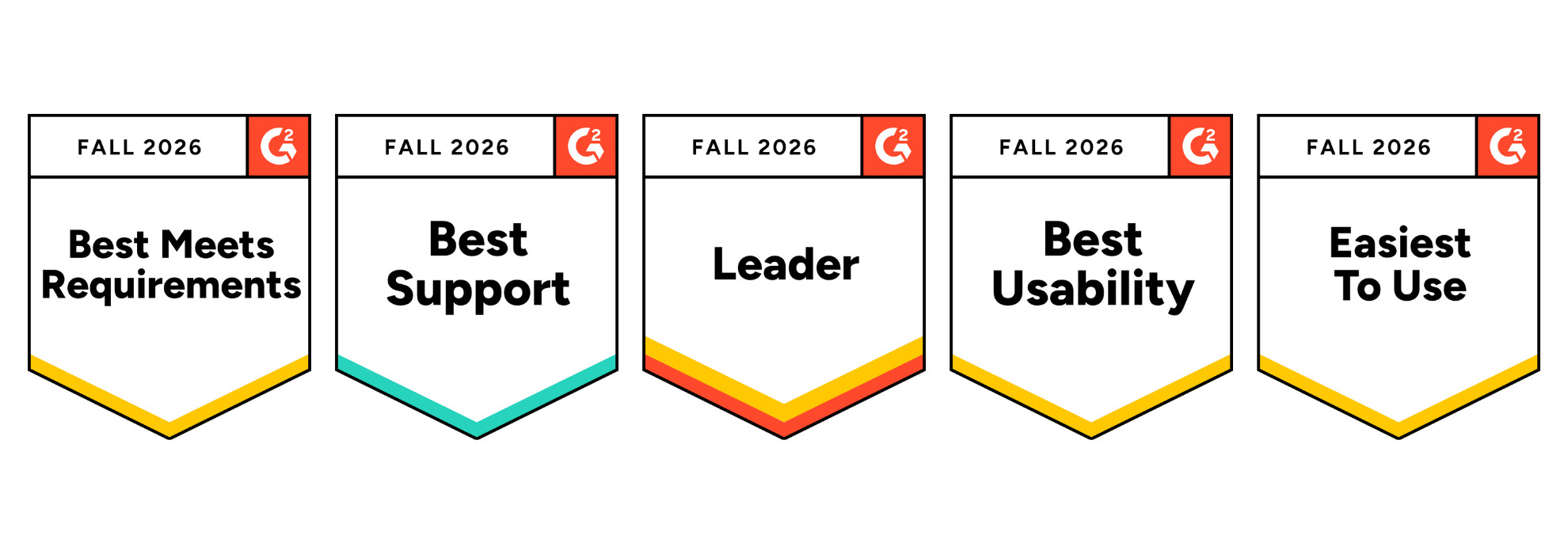
Integrity Advocate has been ranked #1 for Online Proctoring Usability on G2 for the third consecutive season. Based on verified customer feedback, we also earned five Fall 2026 badges recognizing usability, ease of use, support, and overall leadership.
Integrity Advocate has once again been ranked #1 in G2’s Usability Index for Online Proctoring, marking our third consecutive season at the top of the category.
In the Fall 2026 report, Integrity Advocate earned an overall G2 Index Score of 8.60, ahead of Honorlock, Proctorio, Quilgo, Talview, and Meazure Learning. We also earned five G2 badges, including Best Usability, Easiest to Use, and Best Meets Requirements, and were recognized as a Leader in the online proctoring category.
These recognitions are based on feedback from verified users. For us, that is what makes them meaningful. They reflect the experiences of the people who administer assessments, support test takers, and rely on the results.
Integrity Advocate earned the highest overall score in the Fall 2026 Online Proctoring Usability Index:
This is not only another first-place ranking. Our overall index score increased from 8.45 in Summer 2026 to 8.60 in Fall 2026, extending Integrity Advocate’s position at the top of the category.
G2 is the largest peer-to-peer software review platform in the world. Their Usability Index ranks products within a category based on three user-rated dimensions:
Every score comes from authenticated, verified reviews. Companies cannot pay to improve their position. There is no sponsorship or placement influencing the results. The index score reflects what users say about their experience with the product.
Integrity Advocate scored above the online proctoring category average across every usability measure included in the report:
User adoption stands out in particular. Integrity Advocate scored 17 points above the category average and 28 points above Honorlock.
That matters because a platform can have an impressive feature list and still create friction when people are asked to use it. Strong adoption suggests that the experience works in practice, not only during a product demonstration.
In addition to ranking first in the Usability Index, Integrity Advocate earned five G2 badges for Fall 2026 and was recognized as a Leader in online proctoring.
The Best Usability, Easiest to Use, and Best Meets Requirements badges reinforce something we have always believed: assessment security should be strong without being unnecessarily complicated.
Organizations should not have to choose between protecting an assessment and delivering an experience people can successfully use.
Online proctoring sits at a sensitive point in the assessment experience. Test takers may already be under pressure, while administrators need to protect exam integrity without creating unnecessary technical problems or support demands.
A platform that is difficult to access or manage can lead to:
Integrity Advocate was designed to remove those barriers.
There is no software to install and no browser extension to manage. The platform works across devices and browsers and integrates into existing assessment workflows. Test takers can access their assessments without navigating a separate, unfamiliar system, while administrators gain clear evidence and the context needed to evaluate results.
Usability is not separate from assessment integrity. When a platform works consistently, more attention can remain where it belongs: on the assessment and the credibility of its outcome.
Ease of use should never require an organization to compromise on accuracy or defensibility.
Integrity Advocate combines intelligent detection with Verified Human Review™ to provide context behind potential assessment violations. Instead of asking administrators to make decisions based only on an automated flag, our proctoring solutions can provide a clear, reviewable record supported by human judgment.
The result is an approach that protects assessment integrity while remaining practical for the people responsible for administering the program and fair to the people taking the assessment.
Across reviews, users consistently highlight the qualities reflected in the Fall 2026 report: straightforward implementation, ease of use for learners and administrators, seamless LMS integration, responsive support, and a privacy-first approach to assessment integrity.
As one verified user shared:
{{post-block-quote}}
That experience is what the rankings ultimately represent. Not simply a score, but whether the platform helps organizations protect assessments without placing unnecessary friction on their teams or test takers. View more customer stories here.
If you are currently comparing online proctoring solutions, usability should be evaluated alongside security, privacy, and review quality.
Consider asking:
The Fall 2026 G2 results provide an independent view of how leading platforms perform across many of these considerations.
Being ranked #1 once is exciting. Remaining at the top for three consecutive seasons tells a stronger story.
It shows that organizations do not have to accept unnecessary complexity as the price of protecting their assessments. Online proctoring can be secure, privacy-first, easy to administer, and straightforward for test takers.
That is the experience Integrity Advocate was built to provide, and we are grateful to every customer who shared their experience on G2.
The G2 ranking reflects a platform that has been in continuous operation for over a decade:
{{post-cta}}

July 3, 2025
|
5 min de lecture
Frontline workers, remote teams, and field-based professionals cannot wait for a desktop to complete compliance training. Mobile-first proctoring addresses that reality, but mobile access cannot mean compromised security, weaker identity verification, or gaps in compliance records. This post examines who benefits from mobile-first assessment, why browser-based no-install design is essential for both accessibility and security, the compliance implications of BYOD workforces, and how Smart Serve Ontario scaled to handle over 20 times normal test volumes on mobile without a single software installation.
For too long, online training and assessment have been held down by rigid systems restricted to desktops.
Dedicated testing spaces, clunky installs and inflexible tech have created barriers that slow down progress. But today’s workforce isn’t confined to cubicles—and their training tools shouldn’t be either.x
Welcome to the era of mobile-first proctoring - any device, anywhere, anytime.
It’s 2025. AI is everywhere. Everyone has a pocket computer. Yet, far too many training platforms still treat mobile access like an afterthought.
For frontline workers, remote teams and field-based professionals, mobile-friendly training is how work gets done. They rely on it to learn new procedures, complete compliance modules and stay up to date on safety protocols without having to hunt down a desktop or deal with complicated installs.
That kind of accessibility matters—but it’s only half the equation.
Training also needs to meet the same security, compliance and accountability standards as traditional setups.That’s why mobile-first can’t mean adapting desktop-first tools with clunky plugins or limited features.
In an always-on world, learners need tools that meet them where they are, not where the infrastructure happens to be. A mobile-first approach empowers:
This isn’t hypothetical.
When a new recertification mandate shot test volumes over 20x the normal level, Smart Serve Ontario needed a solution that could scale and support thousands of mobile learners on demand. They chose Integrity Advocate. By removing tech barriers such as installs or plugins, mobile-first proctoring helps ensure every worker can stay certified and every organization compliant.
Let’s be clear: a robust, mobile-first platform designed from the get-go isn’t a watered-down version of real proctoring. It's a full-featured experience that includes:
A DHS study and AT&T’s Global State of Cybersecurity survey found that more than half of organizations experienced data breaches due to mobile devices. The culprit? Not always hackers—often the users themselves. Personal devices running outdated software, sideloaded apps or insecure networks introduced vulnerabilities companies never saw coming.
That’s why Integrity Advocate takes a different approach.
Our platform runs in-browser, requires no downloads and doesn’t rely on third-party apps—removing a major attack surface. It’s fully managed, with no storage of unnecessary personal data, and doesn’t leave organizations at the mercy of end-user behavior or mobile device configuration. You get the accessibility of mobile-first training with the control of enterprise-grade compliance.
Training organizations, safety councils and global certifiers are already moving toward mobile-first assessment. Why? Because it aligns better with modern operations, cuts administrative burden and helps protect both reputations and results.
{{post-stat-highlight}}
When a construction worker completes required safety training between jobs, or a health care trainee verifies their identity during a break, the organization gets more than just a completed module. They get proof of participation, verifiable identity and compliance-grade oversight—all without chasing down paper records or managing one-off tech issues.
At scale, the business case grows even stronger. Companies that switch to BYOD smartphones can save up to $341 per employee while enabling access across time zones, connection types and devices. With the global BYOD market projected to reach US $331.6 billion by 2030, it’s clear this is the future of modern testing and credentialing.
As professional training evolves, one thing is clear: it’s no longer tied to testing centers, corporate networks or traditional devices. But with that freedom comes responsibility.
In a mobile, BYOD-enabled world, security, verification and data privacy can’t be afterthoughts. Compliance doesn’t pause just because someone’s on a job site or logging in from a phone.
That’s why Integrity Advocate was built differently.
No installs. No third-party apps. No unnecessary data collection. Just seamless, compliant, secure assessments—anytime, anywhere, on any device.
We make training accessible. We make compliance effortless. And we make sure the only thing learners carry with them is confidence.
Any device, anywhere, anytime.
{{post-cta}}

July 2, 2024
|
5 min de lecture
There is a meaningful difference between monitoring and surveillance in online proctoring, and most programs have not thought carefully about which one they are actually doing. Monitoring confirms identity, verifies participation, and produces a defensible result. Surveillance collects everything it can, flags anything it does not recognize, and leaves programs to sort out the noise. This post draws that distinction clearly, explains what privacy-first proctoring actually looks like in practice, and makes the case for why human review is the only thing that makes an assessment result genuinely defensible when it is challenged.
There is a difference between monitoring and surveillance. Most programs running online assessments haven’t thought carefully about which one they’re actually doing, and that gap is where trust starts to erode.
Monitoring confirms that the right person completed the assessment, stayed engaged, and followed the rules. Surveillance collects everything it can, flags anything it doesn’t recognize, and leaves the program to sort out what any of it means.
One produces a defensible result. The other produces liability.
If your proctoring tool accesses the file system of a personal device, stores recordings your team will never review, or generates hundreds of automated flags with no human judgment behind them, it’s not monitoring. It’s surveillance. And your learners know the difference.
Every program administering online assessments has the same core need: confirm identity, verify participation, and produce a result that holds up to scrutiny.
That’s it.
You’re not trying to catalog everything that happens in a candidate’s home. You’re not trying to build a behavioral profile. You’re trying to answer three questions:
A well-designed proctoring approach answers all three. An over-engineered one tries to answer questions nobody asked, and in doing so, creates new problems. More data. More noise. More privacy exposure. And a test-taking experience that generates complaints before a single result is issued
Privacy-first proctoring is not a softer version of security. It’s a more precise one.
It starts with a design principle: collect only what is necessary to confirm identity and verify engagement. Nothing beyond that scope. No recordings stored by default. No system-level device access. No behavioral data used outside the bounds of the specific assessment.
In practice, that looks like this:
No downloads or extensions. The assessment runs in a browser. No software installs, no hidden permissions, no access to personal files or background applications. A test taker can sit the exam on any device without IT involvement or configuration.
Proportionate data collection. Every feature and every data point collected should have a clear answer to the question: why does this make the result more defensible? If the answer is “it doesn’t,” it shouldn’t be collected. Surveillance produces volume. Monitoring produces clarity.
Data minimization by design. The only data collected is what’s needed to produce a defensible result: identity verification, participation confirmation, and a reviewable record of any flagged behavior. Sensitive data, including ID images, is deleted within 24 hours.
Compliance built in, not bolted on. GDPR, PIPEDA, FERPA, and SOC2 compliance aren’t checkbox items. They reflect a commitment to proportionate data collection, the kind of approach that holds up when regulators or institutional counsel start asking questions.
Here’s what automated flags can’t tell you: whether a behavior was actually a problem.
An algorithm can detect that a second face appeared in the frame. It cannot tell you that the second face belongs to a child who walked in, not an accomplice. It can flag an unusual eye movement pattern. It cannot determine whether that pattern indicates academic dishonesty or a medical accommodation. It can detect a background sound. It cannot decide whether that sound matters.
Those determinations require a person.
At Integrity Advocate, every flagged session is reviewed by a trained human reviewer before any outcome is issued. Not as a premium tier. Not as an add-on. As the standard, at every price point.
That’s the difference between a defensible result and an automated flag you have to explain to a grievance committee.
Programs that rely on automated proctoring alone are producing outcomes they cannot fully stand behind. When a result is challenged, and eventually one will be, “the algorithm flagged it” is not a sufficient answer. A documented, human-reviewed decision is.
Before your next contract renewal or platform evaluation, ask this: what does your current proctoring tool collect, and who reviews it before a result is issued?
If the answer is “a lot” and “no one,” that’s the surveillance model. It may feel thorough. It isn’t defensible.
Privacy-first online proctoring isn’t about doing less. It’s about doing exactly what’s necessary, with human judgment behind every decision that matters. That’s what produces results your program can stand behind. It’s what earns trust from your learners. And it’s what holds up when the stakes are highest.
Integrity doesn’t require surveillance. It requires precision.
{{post-cta}}

May 8, 2024
|
5 min de lecture
The listed price of an online proctoring tool is rarely the full cost. This post breaks down four hidden expenses that organizations often overlook: the support burden created by installation-based tools, the admin time required to investigate false positive flags from AI-only systems, the customization cost of adapting higher-ed-built tools for non-academic audiences, and the potential legal and regulatory liability when a proctoring system cannot produce defensible records.
Previously on the blog, we’ve made the case for treating online proctoring as an investment — in the safety of your learners, and the integrity of your testing. We’ve detailed some of the emerging threats against fair, secure online assessments, and we’ve shown what can happen when these threats aren’t taken seriously.
But we haven’t done a deep dive into the actual cost of online proctoring. Different providers have different billing models; the specific features you need — ID verification, participation monitoring, recorded vs. live proctoring, etc. — as well as the anticipated volume of exams, will all determine your top-line numbers. And while those numbers are important, they don’t tell the whole story. To really understand the potential cost of remote proctoring, you need to understand the ‘shadow costs’ — hidden expenses that can crop up if you focus exclusively on pricing when making your decision.
(ps. If you're looking for Integrity Advocate's pricing, we recommend contacting our sales team, as our services are generally customizable based on your needs.)
The number one complaint we hear from prospective customers coming to Integrity Advocate from a competitor is the high cost of support required to get learners set up and running with other solutions. When an online proctoring tool requires learners to install an application or browser plug-in, or make changes to system settings, support rates may be between 30-40%.
Let’s break that down and look at the numbers. If you run 1000 proctored exams a session, and approximately 30% of those require a support call, that’s 300 support calls/session. If each support call takes 10 minutes to resolve, that’s 3000 minutes, or 50 hours, of tech support required on top of the cost of your proctoring service.
Another hidden cost of online proctoring involves resolving disputes and correcting ‘false positive’ violation flags. Many of the cheapest online proctoring tools rely heavily on AI to identify rules violations. If these aren’t followed up with a human review, innocent test-takers can easily be penalized. Even putting aside the more insidious biases of AI facial recognition, the technology is still too unreliable to be the final arbiter of ethical behavior in an online exam. AI proctoring systems can — and have — mistakenly identified facial patterns in things like wallpaper and houseplants, leading to false positive rules violations.
And what’s the cost of this? Some proctoring services charge for exam retakes, others don’t. Even if there is no additional fee involved, consider the admin time required to investigate learner complaints and clear violations that have been falsely flagged by low-cost, automated online proctoring tools.
One underrated question worth asking when considering an online proctoring system is: ‘how easy is it to accommodate my learners’? Especially when running online testing, accommodation is about more than extra time or support: it’s about adapting a system — generally one built with one very specific user/use case in mind — to meet the unique needs of your program.
Most online proctoring tools are built for a higher ed audience. But we’re seeing more and more clients come from food and alcohol server certification, skills trades/health and safety training, and professional certification. On everything from LMS integration, to rule sets, to participation monitoring, these systems may require extensive customization — and additional time and money — to accommodate the unique user base, environmental and technical requirements of a non-higher ed audience.
All of the hidden costs we’ve spotlighted before involve, in one way or another, the effort required to get a remote proctoring system working perfectly. But what about when things go wrong? Ultimately, the design and implementation of a proctoring system must take into consideration the worst case scenario.
By this we mean, consider the potential cost of a nightmare scenario — say, for example, an employee on a construction site, who has received health and safety certification from your organization, causes an accident on the job. What are the legal, regulatory or reputation implications if you are unable to prove they participated in the training and completed the requirements fully?
The bottom line is that, ultimately, online proctoring systems aren’t something to cheap out on. This doesn’t mean buying the most expensive option on the market, of course — it means doing your research, and considering the full costs and potential implications of your choice.
{{post-cta}}

May 2, 2024
|
5 min de lecture
Courts and regulators across Canada, the EU, and the United States have consistently found that organizations deploying proctoring tools bear liability for how participant data is handled, not the software vendors they use. CASL, GDPR, BIPA, and the Cleveland State Fourth Amendment case all point to the same conclusion: the organization collecting data is the accountable party. This post examines each case and framework and explains what organizations need to do to reduce their exposure.
When a proctoring tool violates a participant's privacy, who is responsible? The software vendor? The organization that deployed it? Both?
Recent legislation and court decisions from Canada, the UK, and the United States have answered this question with increasing clarity: the liability rests with the organization running the testing, not the software provider. For anyone deploying online proctoring, this is not an abstract legal point. It is a direct operational risk.
Organizations that deliver online training and testing have a legitimate need to confirm who is taking their assessments and that participants are engaging in good faith. Meeting that need often requires collecting sensitive personal data: ID images, biometric verification, session recordings, and audio. The question of who bears legal responsibility for how that data is handled has been answered by courts and regulators in ways that most organizations have not fully reckoned with.
The consistent finding across multiple jurisdictions is that the data-collecting organization, not the software vendor, is the accountable party.
Canada's Anti-Spam Legislation was created in 2014 to reinforce best practices in electronic communications and combat spam and related cyber threats. Among its provisions, CASL requires organizations to obtain consent and written acknowledgement before using invasive computer programs, and to provide users with assistance in removing such programs afterwards.
Under CASL, software is considered invasive if it interferes with the user's control of their computer system by opening programs, printing, or accessing files without their knowledge, or if it changes system settings, preferences, or commands without their knowledge.
Online proctoring tools that block restricted sites, monitor web use, require camera access, or install browser extensions clearly fall within this definition. And most proctoring plugins do not provide uninstall assistance, remaining active by design after the session ends to reduce support overhead for the vendor.
The risk for organizations: CASL violations carry regulatory penalties of up to $10 million per violation. If your proctoring system leaves you liable to CASL noncompliance, that exposure belongs to you, not your vendor.
The EU's General Data Protection Regulation has established a universal standard for data privacy that reaches any organization handling the personal data of EU residents, regardless of where that organization is based.
Under GDPR, the organization running the testing is the data controller, while the proctoring tool is the data processor. Fines for inappropriate collection, storage, transfer, or deletion of personal data fall on the data controller, not the data processor.
Ireland's Data Protection Commission made this distinction explicit in a judgment against Slane Credit Union Limited, stating that processors cannot be used by controllers as a legislative safety net, and that it is essential that due diligence is carried out to ensure the protection of personal data.
GDPR fines can reach 20 million euros or 4% of a company's total worldwide annual revenue, whichever is higher. The liability for how a proctoring vendor handles learner data belongs to the organization that chose to deploy it.
American organizations are increasingly coming under regulatory scrutiny for proctoring practices. Illinois' Biometric Information Privacy Act is one of the most consequential examples.
BIPA places liability on organizations when biometric data is collected or used in a way that violates participant privacy, including failing to secure written consent and failing to publish a retention schedule outlining when data will be permanently destroyed.
Two landmark cases illustrate how serious this exposure can be.
BNSF Railway Co. was subject to a $228 million jury verdict for scanning the fingerprints of truck drivers without consent. The case was eventually settled for $75 million. The third-party vendor that provided the scanning technology was not implicated in the charges.
White Castle System Inc. faced a separate BIPA lawsuit in which the Illinois Supreme Court ruled that claims accrue with each individual finger scan, exposing the restaurant chain to a potential liability in the billions of dollars. White Castle ultimately settled for approximately $10 million. Again, the vendor supplying the technology was not the party held accountable.
The pattern across both cases is consistent: the organization that deployed the biometric technology bore the liability. The software vendor did not.
In 2022, a federal court found that Cleveland State University's remote testing requirement of a room scan constituted unreasonable search and seizure in violation of students' Fourth Amendment rights.
Cleveland State used two separate proctoring providers to facilitate these scans. Both were named in the decision. Neither was fined. The university bore the consequences.
This case illustrates two important points. First, the room scan requirement itself was the violation, regardless of which vendor implemented it. Second, choosing a proctoring tool that conducts room scans does not transfer the legal risk to the vendor. The organization that required the scan is the one that faces the consequences when that requirement is found to violate participant rights.
These cases are not outliers. They reflect a consistent and accelerating trend in privacy legislation globally: organizations are responsible for the actions of any third-party software, plugins, or services they deploy. Vendor liability does not substitute for organizational accountability.
For organizations delivering online training and testing, this has direct implications for vendor selection. The question is not just whether a proctoring tool works. The question is whether deploying it creates liability for your organization under CASL, GDPR, BIPA, or other applicable legislation.
The steps that reduce that liability are straightforward: choose a vendor with documented privacy practices, confirm that data handling complies with the legislation applicable to your jurisdiction and your learners' jurisdictions, require clear data deletion timelines, and ensure that any software deployed on learner devices complies with consent and removal requirements.
Integrity Advocate is designed to reduce the compliance exposure that comes with deploying a proctoring tool, not to add to it.
No installation is required in most cases, which eliminates CASL's invasive software provisions entirely for the majority of deployments. Data is collected only for its stated purpose and deleted by default within 24 hours of session completion. Consent is obtained before any data collection begins. Data is stored in GDPR-designated jurisdictions. Room scans are optional rather than mandatory, and can be enabled or disabled based on the organization's assessment of their necessity and proportionality.
These are not policy commitments. They are architectural decisions built into how the platform works.
{{post-cta}}

April 7, 2026
|
5 min de lecture
Before you compare proctoring features or pricing, the model underneath matters most. This post breaks down AI-only, live, and hybrid proctoring, where each fits, and why not all hybrid models are actually hybrid.
Not all proctoring tools work the same way. Before you compare features, pricing, or integrations, the most important decision is the model underneath the platform. If you get that wrong, everything else falls apart.
There are three approaches to online proctoring. Each has a legitimate use case. Each has a real trade-off. And one of them is consistently misunderstood as the safe middle ground when, in practice, not all hybrid models are equal.
As the market scales, programs are under more pressure than ever to choose the right model. Here is what each one actually means and what it means for your program.
AI-only platforms monitor sessions using algorithms. They track eye movement, audio patterns, browser behavior, and screen activity. When the system detects something outside expected parameters, it flags it. The report goes to your institution. Your team decides what to do with it.
The appeal is real. These tools are low cost, highly scalable, and require minimal vendor involvement. For programs running thousands of low-stakes assessments, that efficiency matters.
49% of students globally participated in online learning by March 2025 — driving demand for proctoring that scales without sacrificing accuracy. Source: Business Research Insights, 2026
The risk is also real. AI-only platforms typically flag 15 to 20 percent of all sessions. Many of those flags are not genuine integrity violations. Without a human reviewing the flag before it reaches your inbox, your team is doing that work. The savings on the tool often do not account for the time your staff spends sorting through incidents.
"When a result is challenged, the answer 'the algorithm flagged it' is not a defensible audit trail."
For programs where outcomes carry weight, that gap is a liability.
AI-only works when stakes are low, volume is high, and your institution has capacity to review flags internally.
Live proctoring puts a trained human proctor in the session in real time. The proctor monitors the exam as it happens, can communicate with the test taker, and can intervene if something goes wrong.
The accuracy is high. The human judgment is present. The audit trail is strong. For high-stakes licensing exams, certification bodies with regulatory requirements, and professional credentials where disputes are foreseeable, live proctoring has historically been the answer.
The trade-offs are scheduling and cost. Test takers need to book a time slot. Proctors need to be available. Per-session pricing adds up quickly at scale. For programs delivering hundreds or thousands of exams across flexible windows, the logistics become unworkable.
48% Of students expressed discomfort with webcam-based monitoring during exams — a signal that the model you choose directly affects learner trust in your program. Source: Business Research Insights survey, 2023
Live proctoring is also more intrusive for the learner. Being watched in real time creates anxiety that can affect performance. For programs that care about the experience of their test takers, that friction is worth accounting for.
Live proctoring works when stakes are high, volume is manageable, scheduling is structured, and real-time intervention is a non-negotiable requirement.
Hybrid proctoring combines AI monitoring with human review. In principle, it offers the best of both approaches. In practice, it depends entirely on one question: when does the human review happen, and is it mandatory?
Many platforms that describe themselves as hybrid use AI for detection and offer human review as an optional tier or a paid escalation. That is not a genuine hybrid. It is AI-only with an appeal process.
Integrity Advocate is built on this model. Human review is not an upgrade.
Hybrid proctoring with mandatory human review delivers scale without shifting the review burden to your institution.
When a flag is raised, who reviews it, and when?
If the answer is your team reviews it, or a human reviews it if you escalate, you are looking at AI-only with extra steps. If the answer is our reviewers examine every flag before it becomes an outcome, you are looking at a genuine hybrid. That question takes 30 seconds and tells you more than a 90-minute demo will.
{{post-cta}}

December 16, 2022
|
5 min de lecture
A training completion record proves that a course was accessed. It does not prove who accessed it or whether they engaged with it. The PricewaterhouseCoopers case, in which fines of over one million Canadian dollars were assessed after staff shared answers to internal training courses, demonstrates what happens when organizations cannot verify who actually completed their training. This post examines the regulatory standard, the insurance gap, and how Integrity Advocate helps organizations build training records that hold up to scrutiny.
Corporate training serves many purposes. Meeting regulatory requirements. Building workforce capabilities. Demonstrating due diligence. But across all of these purposes, the same assumption is made: that a training completion record is proof that training happened.
It is not.
A completion record is proof that training was accessed. It is not proof of who accessed it, whether they engaged with it, or whether the person on record is the person who actually completed it. In a regulatory investigation or legal proceeding, that distinction matters enormously.
PricewaterhouseCoopers is one of the Big Four accounting firms and the second-largest professional services network in the world. In a published regulatory investigation conducted by the Canadian Public Accountability Board, fines of over one million Canadian dollars were assessed after it was found that junior staff, managers, directors, and partners of PwC shared answers to internal training courses on auditing, accounting, and professional independence.
The regulator found that PwC had failed to establish policies and procedures to provide the firm with reasonable assurance that its workforce was completing required training as intended.
This was not a small organization with limited resources. This was one of the most sophisticated professional services firms in the world, with dedicated compliance infrastructure. And still, the internal training program failed to verify that the right people were completing the right training.
If it can happen at PwC, it can happen anywhere.
Conversations with private company leaders reveal a consistent gap in understanding. Regulators generally do not stipulate specific oversight requirements for how training must be delivered or verified. They specify the outcome: that the workforce is trained.
The assumption that providing access to online training satisfies that outcome is where organizations get into trouble. Online training records are proof of training accessed, not training completed, and not by whom. Company leadership often has no evidence of individual workers' participation, and no process in place to obtain it.
When a regulatory investigation or legal action follows a workplace incident, that gap becomes the story.
When facing regulatory or legal action, many organizations turn to insurance protection as a backstop. It is worth understanding what insurance does and does not cover.
Insurance policies do not cover bad faith or gross negligence. The argument that company leaders have demonstrated gross negligence rests on the definition established in Hart v. Kline (1941): gross negligence as an indifference to a legal duty of care. An organization that provided training access without any mechanism to verify who completed it, or whether they engaged with it, may find that argument difficult to counter.
A completion record that cannot confirm identity or participation is not a defense. It is evidence of the gap.
Integrity Advocate works with organizations to close that gap by verifying the identity and confirmed participation of internal personnel in every training session. The result is a record that demonstrates not just that training was accessed, but that the right person completed it and was present throughout.
This eliminates the exposure that comes from unverifiable training records in regulatory investigations, legal proceedings, and insurance disputes.
As one client senior leader put it: "How we deliver information to our personnel is indicative of the importance of that information to them."
The way an organization approaches training verification sends a signal about how seriously it takes what it is training people to do. For compliance training, safety training, and any instruction with regulatory or legal weight, that signal matters.
{{post-cta}}

August 1, 2020
|
5 min de lecture
Industry regulators and standards bodies across HR, health and safety, petroleum, professional accreditation, and standards-setting are aligned: online training must include identity verification and active proctoring to be considered legally defensible. This post examines what five major industry bodies require, where legislation has made proctoring mandatory, and what it means for organizations running online safety training today.
When an organization faces legal scrutiny over a workplace incident, one of the first questions asked is whether employees received proper training. The second question is whether that training can be verified.
Industry regulators and standards bodies set the benchmarks courts use to determine due diligence. If your organization's training practices fall short of what industry associations define as reasonable, that gap becomes a liability. And across multiple industries, those associations are now saying the same thing: online training must include identity verification and proctoring to count.
Here is what five major industry bodies have said, and what it means for your organization.
Courts do not invent the definition of "reasonable" from scratch. They look to the standards published by recognized industry organizations to determine whether an employer took all practically reasonable steps to prevent harm.
That means the training practices your industry association recommends are not just best practices. In the event of an incident, they become the benchmark against which your organization is measured.
As more training moves online, those standards increasingly address a specific question: how do you know the right person completed the training, and that they actually participated?
HR professionals use online training to address ethics, harassment, violence prevention, and job-specific compliance. In 2017, the Chartered Professionals in Human Resources (CPHR) issued an alert to members conducting online training of regulatory, due diligence, or operational significance:
"Some organizations have already responded by not accepting online training for high-risk activities, while others have mandated the utilization of technology that verifies both the identity and the participation of personnel completing online training that is legally and/or operationally critical. Technology exists that mitigates the issues facing compromised training by verifying both the identity and participation of trainees."
Organizations in high-risk operational sectors use online training to manage safety and emergency preparedness. The Canadian Association of Petroleum Producers (CAPP) has stated directly that it is vital that employers can verify that the intended personnel received the online training and that they participated in it as intended.
Health and safety bodies are responsible for defining what counts as reasonable risk control for their sectors. In the IOSH Alberta Industry best practice guidelines, they state that identity verification and proctoring technology is particularly critical when organizations use web-enabled educational materials as part of risk control strategies.
Organizations that issue Continuing Education Units (CEUs) have a direct stake in confirming that the person who registered for training is the person who completed it. The IACET Standard for Continuing Education and Training, category 8.1, states that the provider shall have a process verifying that the learner who registers and participates in the learning event is the same learner who receives IACET CEU.
Standards bodies provide the technical requirements that regulators and industry groups reference. The ANSI/ASSE Z490 standard specifies that each trainee being evaluated shall be properly identified, and that delivery records for each training event shall identify the trainee's participation in the training.
Industry standards inform expectations. But in some jurisdictions, those expectations have become legal requirements.
For OSHA training in New York City, only in-person training and actively proctored online training will be accepted. The standard is explicit: unproctored online training does not meet the requirement.
In November 2020, Transport Canada added requirements for online Dangerous Goods training stating that the person's identity has been confirmed prior to or at the time of the training, and that training is completed by the person whose identity has been confirmed prior to or at the time of the assessment.
These are not suggestions. They are compliance thresholds. Organizations that cannot demonstrate identity verification and active participation monitoring for regulated training are exposed.
The direction is clear across every sector examined here. Online training without identity verification and participation monitoring is increasingly unacceptable, both to industry bodies and to regulators. The organizations that recognize this now are the ones that will be able to demonstrate due diligence if it ever matters in court.
Integrity Advocate works with organizations across training, certification, and compliance sectors to verify learner identity and confirm participation in online safety training, so the record your organization holds is one you can stand behind.
{{post-cta}}

November 1, 2020
|
5 min de lecture
Proctoring software that requires installation gives vendors access to webcams, microphones, browsing history, and personal files, often without users fully understanding what they are agreeing to. This post examines the real risks of browser extensions and plugins, the Cassidy Wolf case as a landmark example of what can go wrong, and how Integrity Advocate's no-download, browser-based architecture eliminates most of these risks by design.
As children, most of us were told never to talk to strangers. The reasoning was straightforward: not everyone can be trusted, and the risk of getting it wrong is too high.
That lesson served us well offline. Online, we seem to have forgotten it entirely.
Every day, people install applications, plugins, and browser extensions onto their devices without giving it much thought. A productivity tool here, a proctoring extension there. What most people do not realize is what can come along for the ride.
The risks of installing unfamiliar software range from inconvenient to serious. Depending on what is embedded in the code, a plugin or extension can:
That last one is not a hypothetical.
Miss Teen USA Cassidy Wolf was among the first public figures to experience what happens when a device is compromised through an inadvertent software installation. Her computer was infected with a Remote Administrative Tool, commonly known as a RAT, which gave a hacker complete control of her webcam without her knowledge or consent.
She was not alone. More than two dozen women had their computers compromised by the same individual. An extensive FBI investigation ultimately resulted in the hacker, a student at the time, being sentenced to prison.
The case was a turning point in public awareness about the risks of software installation. But the threat has not gone away. If anything, the volume and sophistication of malicious extensions has grown significantly since then.
Online proctoring software sits in a uniquely sensitive position. It is installed on personal devices, often by students or workers who have no real choice in the matter. It accesses the webcam, microphone, and in some cases the full contents of the device. And it typically operates in the background, with limited visibility into what it is actually doing.
That is a significant amount of access to grant to any software, let alone software from a vendor whose code has not been independently reviewed.
There is no shortage of cases where browser extensions have caused serious harm, and proctoring extensions are not immune. Organizations that require test takers to install proctoring software are asking them to accept a level of risk that most people do not fully understand when they click install.
Integrity Advocate was built to avoid this problem entirely.
In most cases, Integrity Advocate requires no plugin, extension, or application installation to use the service. The platform is browser-based and accessible via any secure browser, on any device, at any time. There is nothing to install, nothing running in the background, and no code sitting on a test taker's machine after the session ends.
For use cases that do require a lockdown browser, Integrity Advocate takes a fundamentally different approach than most providers:
This matters because the majority of install-based risks come from updates pushed after the initial installation, often without the user's awareness or explicit consent. Removing that vector removes most of the risk.
We still tell children not to talk to strangers online. The same instinct that underlies that advice applies to software. If you would not hand a stranger the keys to your house, you should think carefully before granting an unfamiliar application access to your webcam, microphone, and file system.
Organizations choosing a proctoring provider have a responsibility to apply that same scrutiny on behalf of the people taking their assessments. The question is not just whether the software works. It is whether the people required to install it can trust what it does.
Want to see how a no-download proctoring solution works in practice?
Book a Demo →
{{post-cta}}

October 17, 2025
|
5 min de lecture
Online assessments should be fair, secure, and accessible. As exam tools evolve, so do attempts to game them. This post explains how Integrity Advocate prevents the most common forms of online cheating, including hidden plugins, impersonation, unauthorized devices, and off-camera assistance, through a privacy-first combination of identity verification, AI-assisted monitoring, and human review that keeps evidence audit-ready and the learner experience low-friction.
Online assessments should be fair, secure, and accessible. As online exam tools evolve, so do attempts to game the system, making online cheating prevention a crucial focus. Integrity Advocate helps you prevent cheating without adding complexity, combining identity verification, environment checks, AI-assisted monitoring, and human review to protect integrity while respecting learner privacy.
Privacy-first prevention protects integrity without collecting more data than necessary or taking intrusive control of a learner’s device. It runs inside your LMS, uses targeted signals rather than full device access, and keeps data retention limited and transparent, which is vital for effective online cheating prevention.
Why we believe in it
Security should earn trust. When learners understand what is collected and why, and when the experience stays accessible and low-burden, participation improves, compliance is easier to maintain, and your outcomes are more defensible.
How it prevents cheating for online exams
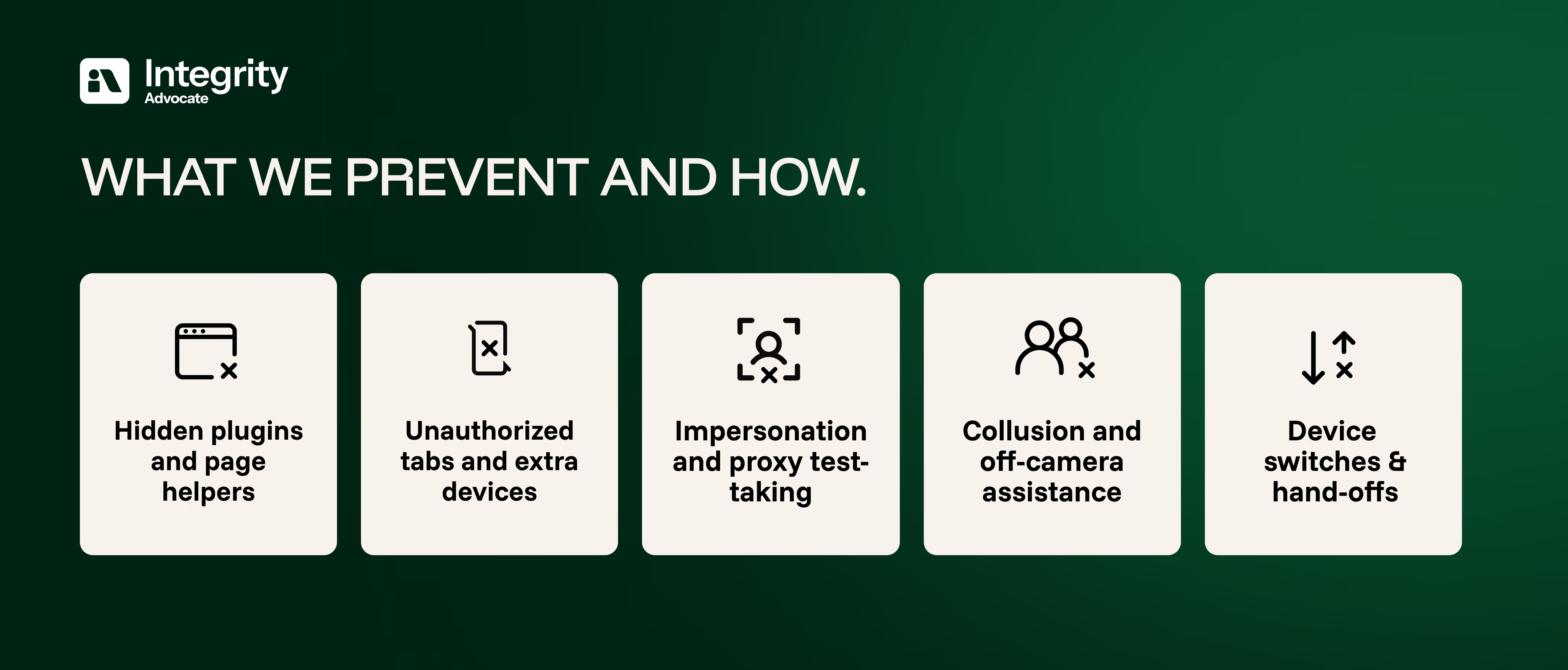
Preventing these risks reliably requires the right balance of automation and human judgment to optimize online cheating prevention.
Automation finds patterns at scale and humans add context, fairness, and final judgment. Integrity Advocate blends both to reduce false positives and deliver decisions you can defend to regulators, customers, and accreditors, while keeping the experience seamless for learners with a focus on online cheating prevention.
Want to watch how we detect hidden plugins, prevent impersonation, and keep sessions fair without extra burden on learners? Request a demo
{{post-cta}}